Create the Program
Create the valid IN, OUT, Fishing, POA, or Transition Program for a CIS day.
Create the Program from the assigned CIS so its date, clients, lodge, and trip context remain connected.
Start with the day context
Guide Mobile does not show one static activity list:
- on arrival, the assigned transfer Guide can choose IN only, IN + Fishing, or IN + POA; other Guides see the arrival as coordination context and choose Fishing or POA;
- an ordinary day offers Fishing or POA;
- the last day uses OUT only; and
- an internal lodge boundary offers Transition, Transition + Fishing, or Transition + POA.
IN and OUT use the authoritative CIS transfer. Transition keeps its route and passenger manifest read-only. Fishing requires a Beat. POA requires an activity and Trailhead coordinating guide; an external provider is optional.
IN only and OUT only count as 0.50 day. IN + Fishing and IN + POA count as 1.00 day and cannot form the two-half-day OUT/IN calendar pair.
For a Fishing variant, choose the Beat
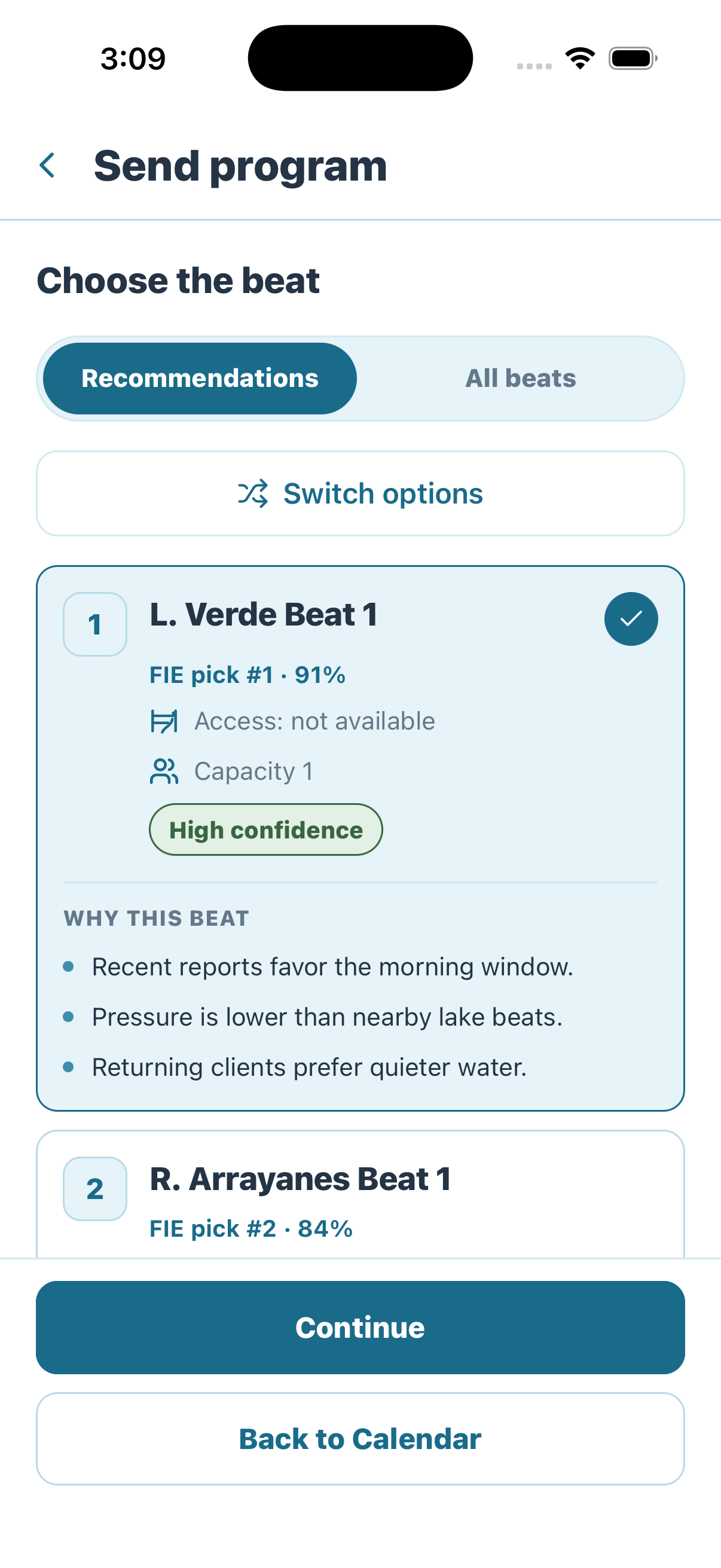
Program creation starts by choosing a beat from recommendations or the complete beat list.
- Recommendations ranks suggested beats and explains why each one fits the field day.
- All beats exposes the complete selection when the recommendation is not appropriate.
- Each recommendation shows confidence, access availability, capacity, and supporting reasons.
- The checkmark identifies the currently selected beat; Continue advances with that selection.
Recommendation is not clearance
A high-confidence recommendation can still show unavailable access or insufficient capacity. Read those constraints before continuing; later conflict review determines whether the Program can proceed.
Confirm clients or the transfer manifest
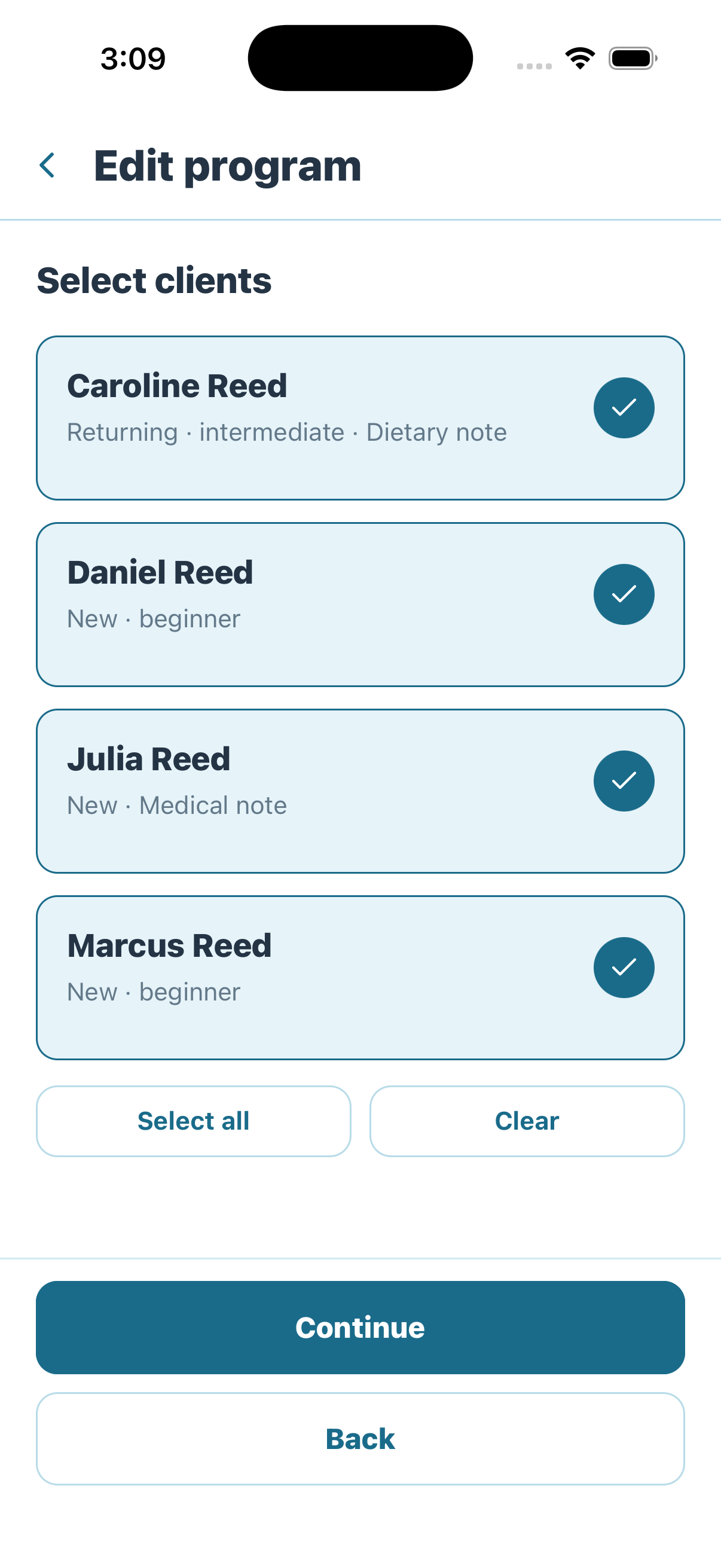
Choose which CIS clients will participate in this Program after selecting the beat.
- The checkmark identifies each client included in the Program.
- Client cards surface useful preparation context such as returning status, experience, and dietary or medical notes.
- Select all includes the full CIS group; Clear removes the current selection so the guide can rebuild it.
For ordinary Fishing or POA, include only participating clients. IN preselects arriving clients and lets the guide confirm them. Transition automatically uses the transferring CIS clients and does not allow the guide to rewrite the manifest.
Review and send
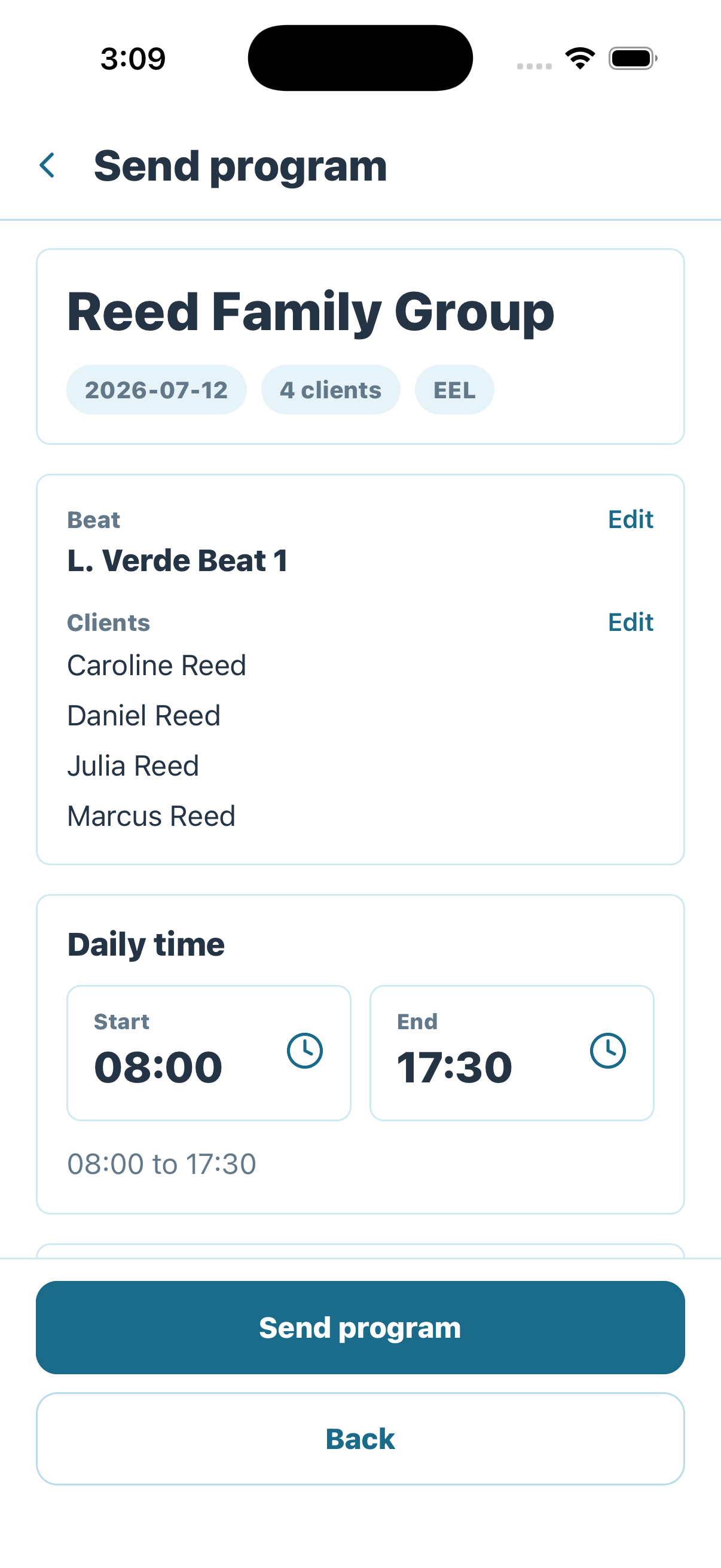
Review the complete Program summary before sending it into the next workflow state.
- Confirm the group, date, client count, and lodge at the top of the review.
- Recheck the Beat for Fishing or the activity and optional provider for POA.
- Confirm authoritative IN/OUT or Transition routes rather than recreating them.
- Confirm only the logistics and time fields shown for the selected variant.
- Equipment requirements and safety notes are no longer duplicated in this proposal step; use the CIS gear and source safety/Access records instead.
- Use Send program only when the summary matches the intended field day.
Sending triggers the Program conflict check.
Required Guide licenses
For every Fishing variant, Trailhead also compares the assigned Guide's license holdings with the requirements owned by the selected Beat's Access. The holding must use the same license match and be valid on the Program date.
If a required Guide license is missing, expired, or not valid yet, Send program is rejected and no Program or downstream allocation is created. The message identifies the Guide, license, and Beat. Update the Guide's licenses or choose another eligible Guide or Beat, then send the same draft again. A client-only license requirement does not block the Guide.
Automatic readiness and two different exceptions
- No conflict: the Program becomes ready automatically. Coordinator review is not required.
- FIE deviation: the assigned Guide may choose a non-recommended eligible Beat, but must record the reason. It submits directly and never enters coordinator approval.
- Shared Beat-capacity conflict: the Program stays blocked until the daily Guide Coordinator moves one eligible Program, records an exact capacity exception, or escalates to Head Guide.
When the review finds a conflict
The lodge's daily Guide Coordinator owns real shared capacity conflicts, not a Guide's FIE deviation. Open the conflict banner immediately before Calendar, compare the affected Programs, choose the Program that should move, select a safe same-lodge Beat, and review the exact change before confirming. Trailhead starts with no Program selected and rechecks live ownership and capacity before applying the move.
Conflict resolution is an exception path
If the Guide Coordinator cannot make a safe routine decision, escalate the complete conflict with a reason. Both Programs remain blocked and Head Guide becomes the final decision owner. Do not create a second Program to bypass the conflict. A capacity exception is valid only for the exact current set of conflicting Programs; a membership change reopens review.
Next: execute the Program. A conflict-free Program proceeds automatically; coordinator involvement is required only for a conflict.